
NeuroNav
I built an AI-powered safety system that helps blind pedestrians detect silent electric and hybrid vehicles before those vehicles become a near-miss.
NeuroNav turns a smartphone into an electronic eye, using on-device YOLOv8 computer vision to detect vehicles and translate danger into synchronized voice and haptic alerts. The system is built for the moments where trust matters most: crosswalks, parking lots, turn lanes, and quiet intersections where traditional auditory cues fail.
This case study documents Phase 1 of the product: validating whether blind users can understand, trust, and act on AI-generated safety signals before scaling into formal perception benchmarking and field deployment.
Product Snapshot
- • Problem: Silent electric vehicles break the sound-based survival strategies blind pedestrians rely on.
- • Solution: On-device AI + voice-first multimodal alerts.
- • Users: 8 blind and visually impaired participants.
- • Result: 100% understood the system’s purpose within 2 minutes.
- • Stage: Interface validated, ready for perception benchmarking and field trials.
- • Constraint: Safety-critical latency under 500ms with near-zero tolerance for false negatives.
"This would boost my confidence walking around outside."
- Participant P6, Iowa Department for the Blind User Testing
This was not a convenience product. It was a trust problem disguised as a detection problem. The hardest challenge was not just identifying vehicles; it was designing a human-AI interaction model strong enough to earn trust in a safety-critical context where one missed alert could end adoption permanently.
- Role Lead designer and developer across product strategy, user research, UX architecture, AI interaction design, implementation, and testing.
- Project Type Master of Science Capstone Project
- Timeline March 2025 – Dec 2025
- Tech Stack Unity 6 LTS, C#, AR Foundation, YOLOv8, Barracuda Inference
- Collaborators Iowa Department for the Blind (Testing Partner)
- Status Phase 1 Complete • Interface Validated • Ready for Field Trials
- Focus Accessibility, safety-critical AI, multimodal interaction, trust calibration
- GitHub View Repository →
The Problem
Electric and hybrid vehicles have created an invisible accessibility crisis. Research documented a 37% increase in pedestrian-vehicle accidents involving blind individuals when compared with traditional combustion vehicles.
The danger peaks at low speeds, exactly when pedestrians cross streets, move through parking lots, or navigate intersections. In the moments where engine noise used to communicate safety, silence now creates ambiguity.
Blind pedestrians already use sophisticated compensatory strategies like traffic pattern recognition and environmental sound mapping. Silent vehicles do not simply make crossing harder; they break the reliability of those strategies at the exact moment a correct decision matters most.
User Voices from Research
"Those stupid quiet cars… you think it's safe, then zap."
"If it's electric, I won't even know it's there."
"I've stepped out thinking it's safe when it really wasn't."
The Gap
Existing assistive tools focus on wayfinding, obstacle avoidance, or on-demand scene description. None are designed as a proactive, always-on safety layer for silent moving vehicles - the precise gap that produces real-world fear, hesitation, and near-miss risk. NeuroNav is the only product category built specifically for this moment.
Why This Is a Market Problem, Not Just a Design Problem
There are approximately 7.6 million blind and visually impaired adults in the US, with global figures exceeding 250 million. Electric vehicles now account for over 20% of new car sales - and NHTSA's mandated acoustic vehicle alerting systems only activate below 18.6 mph, leaving the exact pedestrian-crossing speed range largely unaddressed.
The AFB's 2023 Technology Report found blind users spend ~$47/month on assistive technology, and 73% said they would pay more for life-critical safety features. The freemium model with a $4.99/month premium tier targets this willingness directly, with a path to B2B licensing through transit authorities and accessibility advocacy organizations.
Pain Point Severity Mapping (8 Participants)
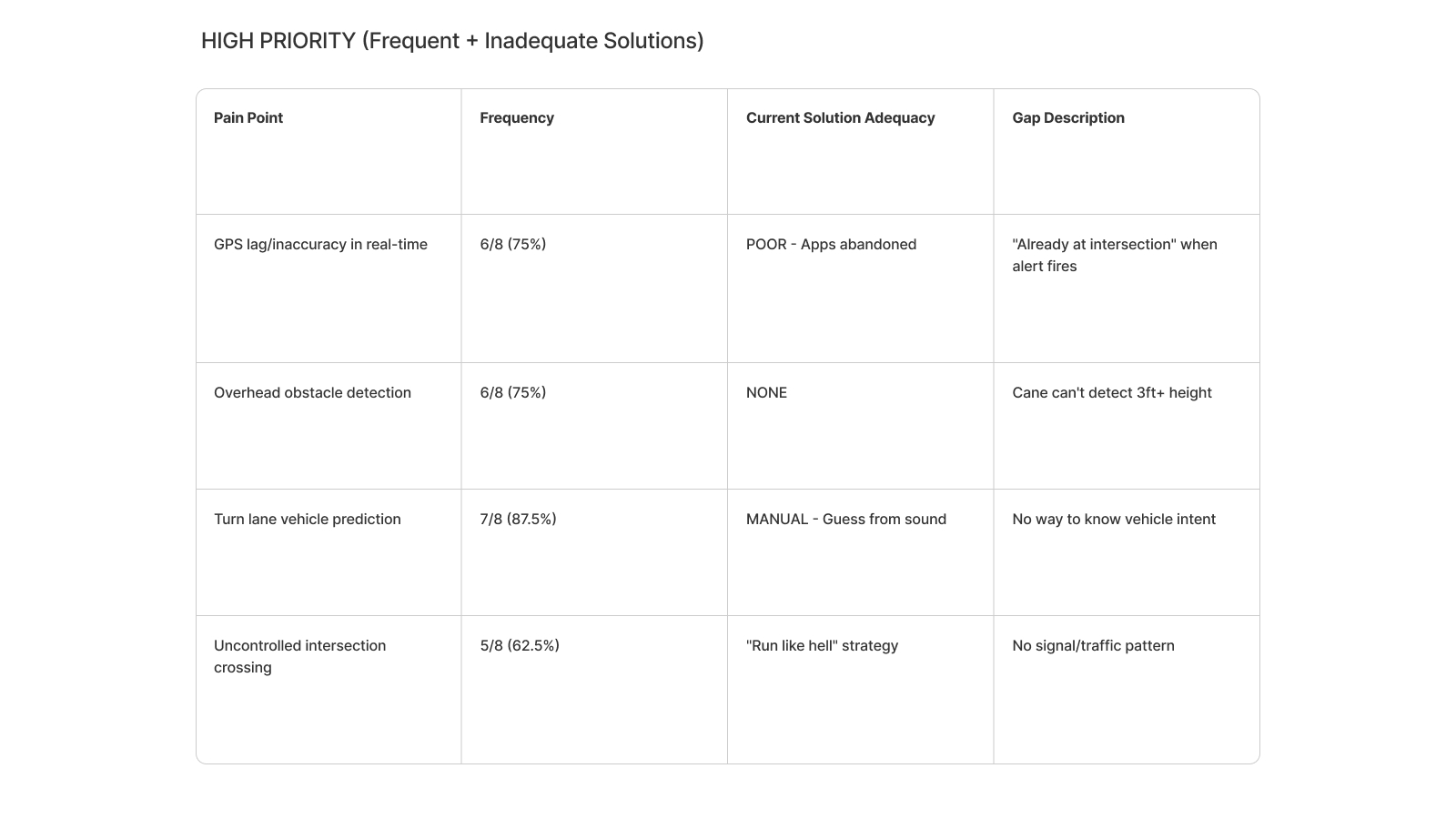
To separate inconvenient issues from life-threatening failures, I mapped every breakdown by frequency, emotional intensity, and workaround effectiveness. Three issues emerged as critical with no reliable workaround: silent electric vehicles, snow-related sensory deprivation, and close calls at intersections.
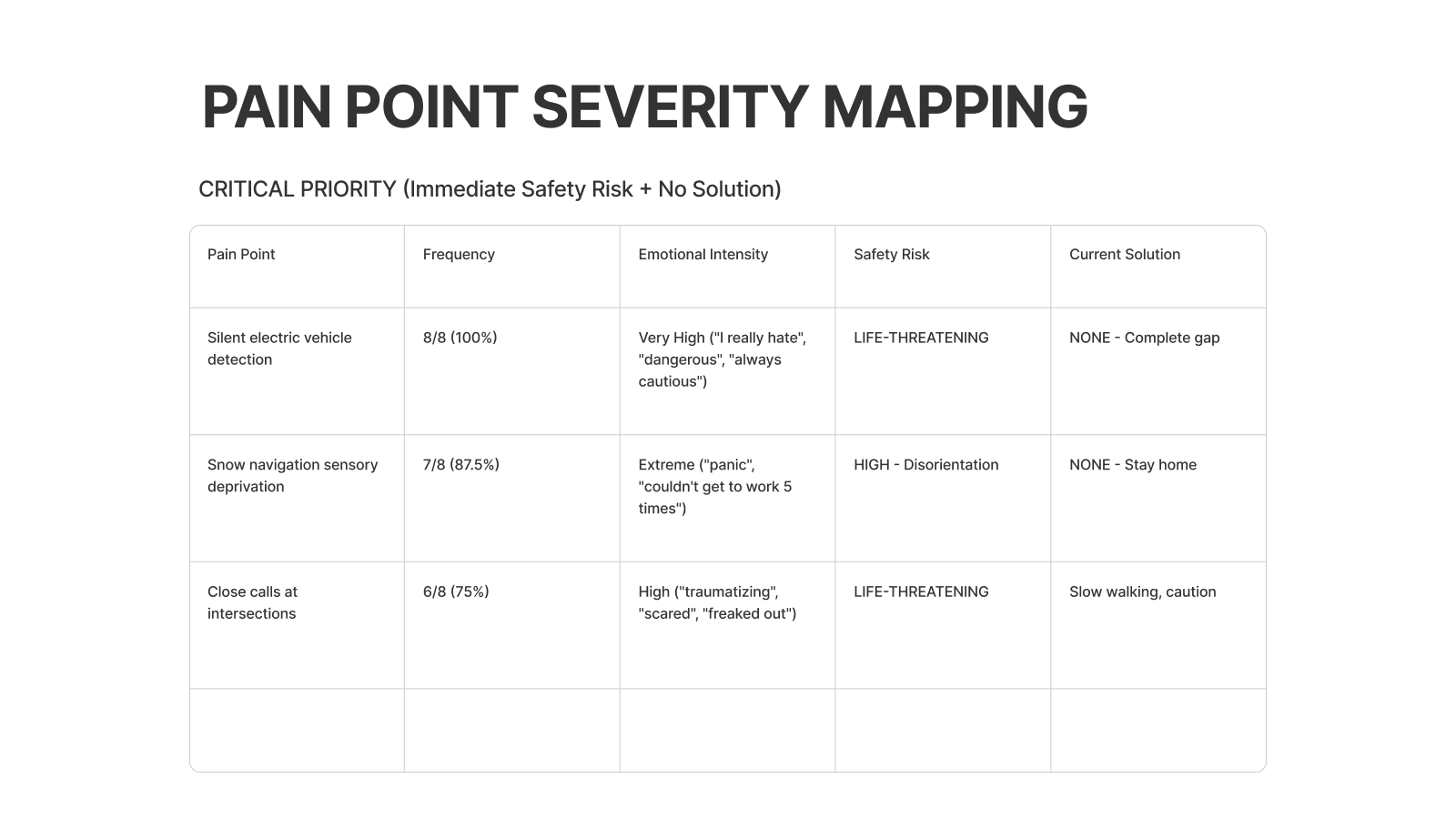
- • Silent electric vehicle detection was mentioned by 8/8 participants (100%).
- • Snow conditions caused complete navigation breakdowns for 7/8 participants.
- • Close calls at intersections were common for 6/8 participants, with no scalable strategy beyond “walk slower” or “be extra careful.”
- • GPS lag, overhead obstacles, turn lane prediction, and uncontrolled crossings informed roadmap opportunities beyond the MVP.
Why This Matters: A Systems Perspective
This is not just an accessibility feature idea. It is a systems problem spanning transportation, urban design, AI trust, public safety, and social equity. The move to electric mobility solved one problem while quietly creating another.
Why NeuroNav Is Different
Most navigation products for blind users sit at one of two extremes: generic GPS routing or reactive visual description. NeuroNav occupies a different category: proactive, real-time hazard detection built for high-stakes decision moments.
- • Built specifically for the silent vehicle crisis.
- • Proactive hazard monitoring instead of reactive image interpretation.
- • Architected around sub-500ms latency and safety-first decision making.
- • Designed with blind users from day one, making trust and co-design part of the product moat.
Core User Needs Identified
Instant Detection
Threat-level communication in real time as vehicles approach.
Absolute Reliability
One false negative can destroy adoption; reliability is the product.
Independence Without Fear
Confidence in public movement without constant anxiety.
Multimodal Alerts
Redundant feedback that still works in noise, rain, and sensory overload conditions.
Hands-Free Interaction
The system cannot interfere with a cane, guide dog, or existing navigation strategies.
Sensory Translation
Translate a visual threat into language users already trust and can act on immediately.
Research & Contextual Inquiry
I conducted 8 contextual inquiry interviews with blind and visually impaired participants, observing real navigation strategies, failure modes, trust thresholds, and technology adoption patterns.
Four Anchor Personas
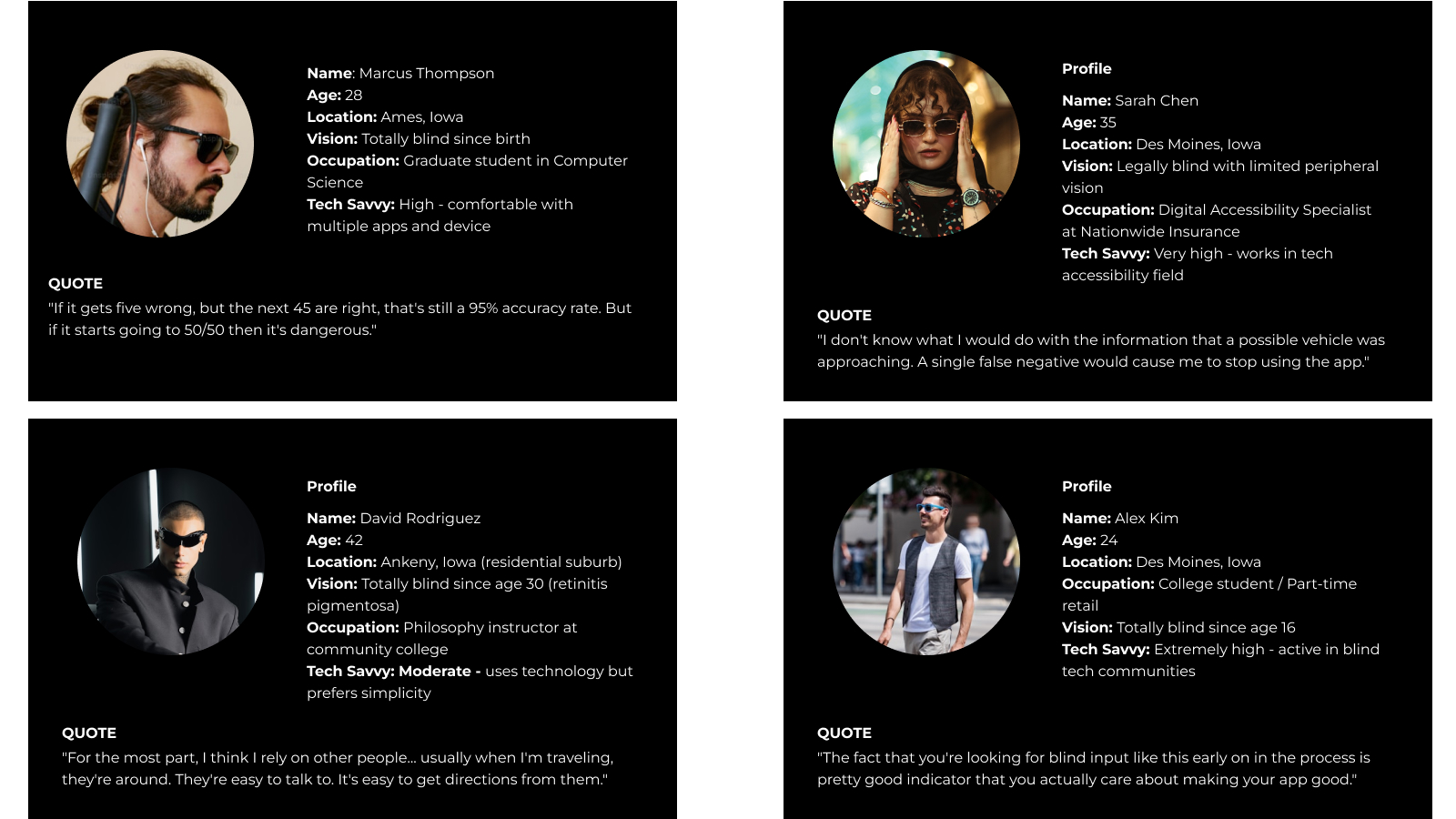
From the 8 participants, I synthesized four anchor personas representing distinct safety profiles and design tensions. Every major design decision can be traced back to one of these people.
- • Marcus – The Silent Vehicle Survivor. Hard-of-hearing cane user who relies heavily on traffic sound patterns. NeuroNav had to prioritize clear directional warnings over rich descriptions.
- • Sarah – The Zero-Tolerance Skeptic. A single false negative would mean permanent abandonment. NeuroNav had to expose uncertainty and preserve user control.
- • David – The Overhead Obstacle Magnet. His needs pushed the roadmap toward broader hazard detection beyond vehicles alone.
- • Alex – The Construction Zone Navigator. His context surfaced the need for dynamic environmental awareness and future community reporting features.
Critical Breakdowns Observed
- • Silent electric vehicles approaching from any direction
- • Turning vehicles that change trajectory unpredictably
- • Weather conditions masking audio cues
- • Multi-lane confusion at complex intersections
- • Inability to judge vehicle distance, speed, or trajectory
User-Expressed Requirements
- • Detection accuracy target of at least 90%
- • False positive rates below 10%
- • Combined haptic and sound alerting
- • A simple, learnable interface
- • Adverse condition support
- • Offline capability
How Blind Pedestrians Actually Cross Intersections
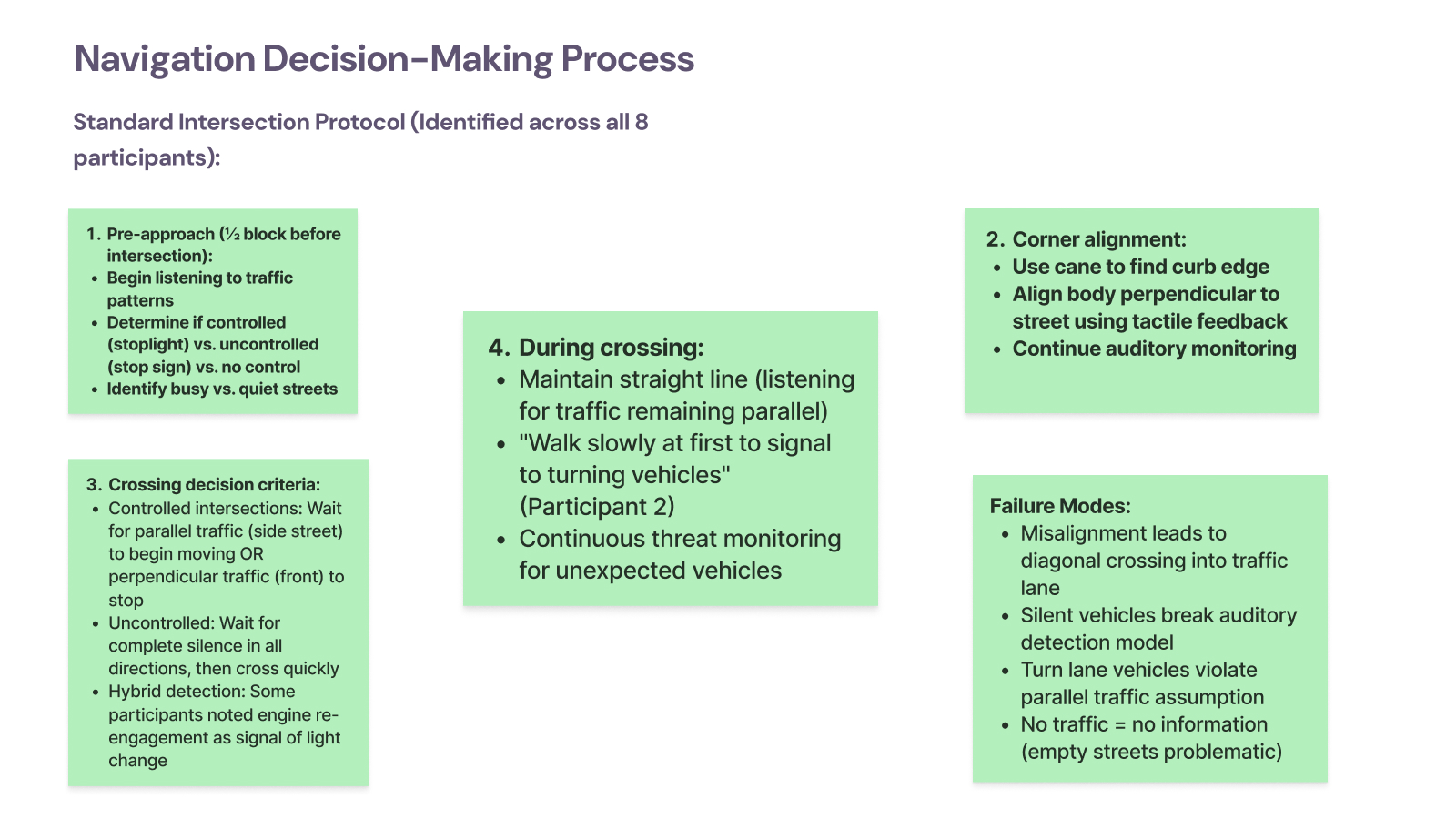
Shadowing participants at real intersections revealed a structured four-stage crossing model, and exposed exactly where silent vehicles break it.
- Pre-approach: Determine whether the intersection is controlled or uncontrolled by reading traffic patterns.
- Corner alignment: Use cane and curb feedback to align the body before crossing.
- Crossing decision: Listen for reliable traffic cues that indicate whether movement is safe.
- During crossing: Maintain alignment while continuously monitoring for new threats.
Observed failure modes:
- • Misalignment causing diagonal drift into traffic lanes
- • Silent vehicles breaking the auditory model entirely
- • Turn lane vehicles violating assumptions about parallel traffic
- • Quiet streets providing too little information to cross confidently
Technology Adoption & Abandonment Pattern
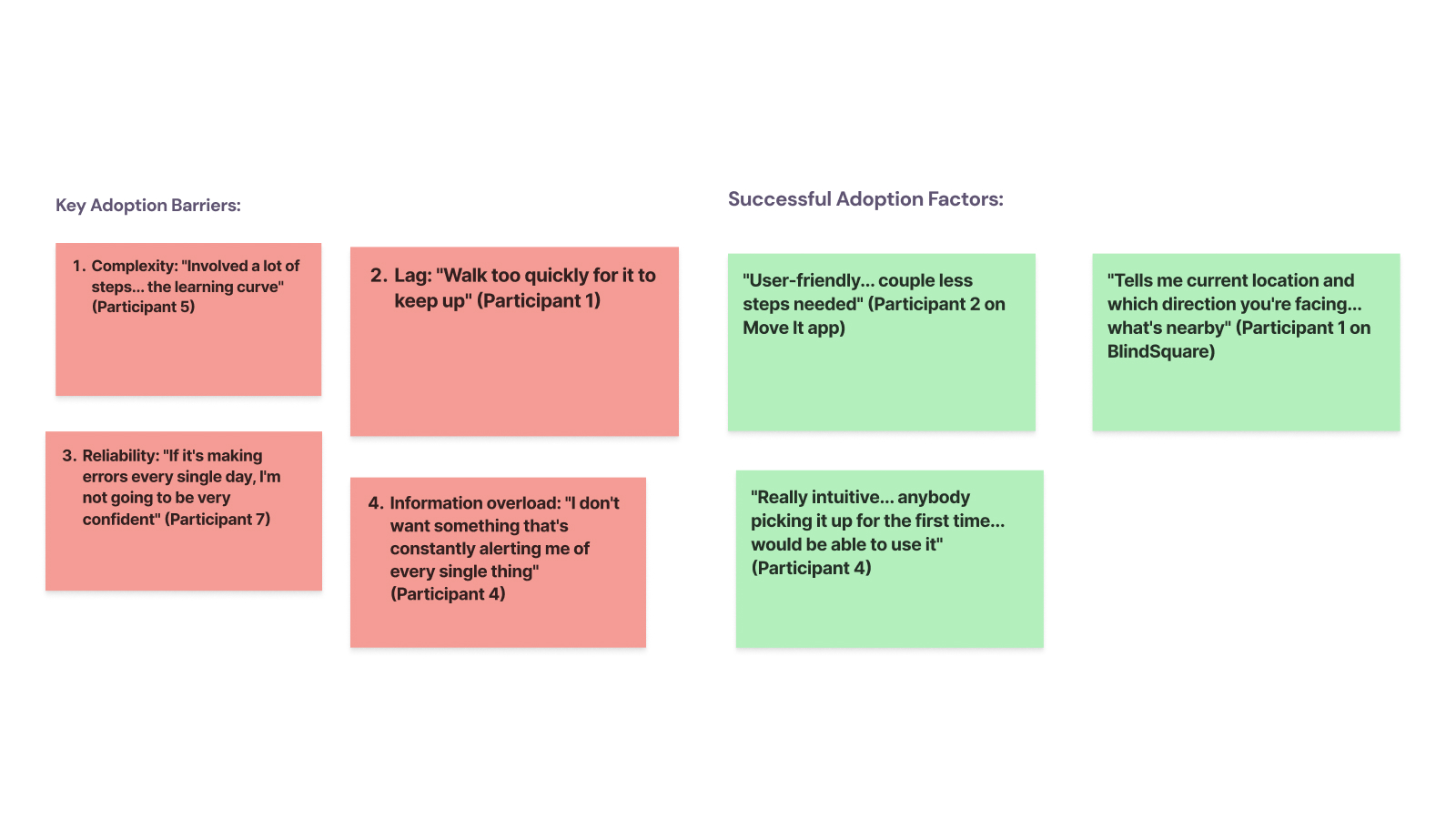
Participants rarely discover assistive tools through the app store. Adoption happens through trusted networks, and the trial window is brutal: if the product fails in the first few uses, it is abandoned permanently.
Key adoption barriers
- • Complexity and steep learning curves
- • Lag during real movement
- • Daily errors that erode trust
- • Information overload
Successful adoption factors
- • Simple flows with only essential actions
- • Clear communication of orientation and situation
- • A product that feels usable on day one

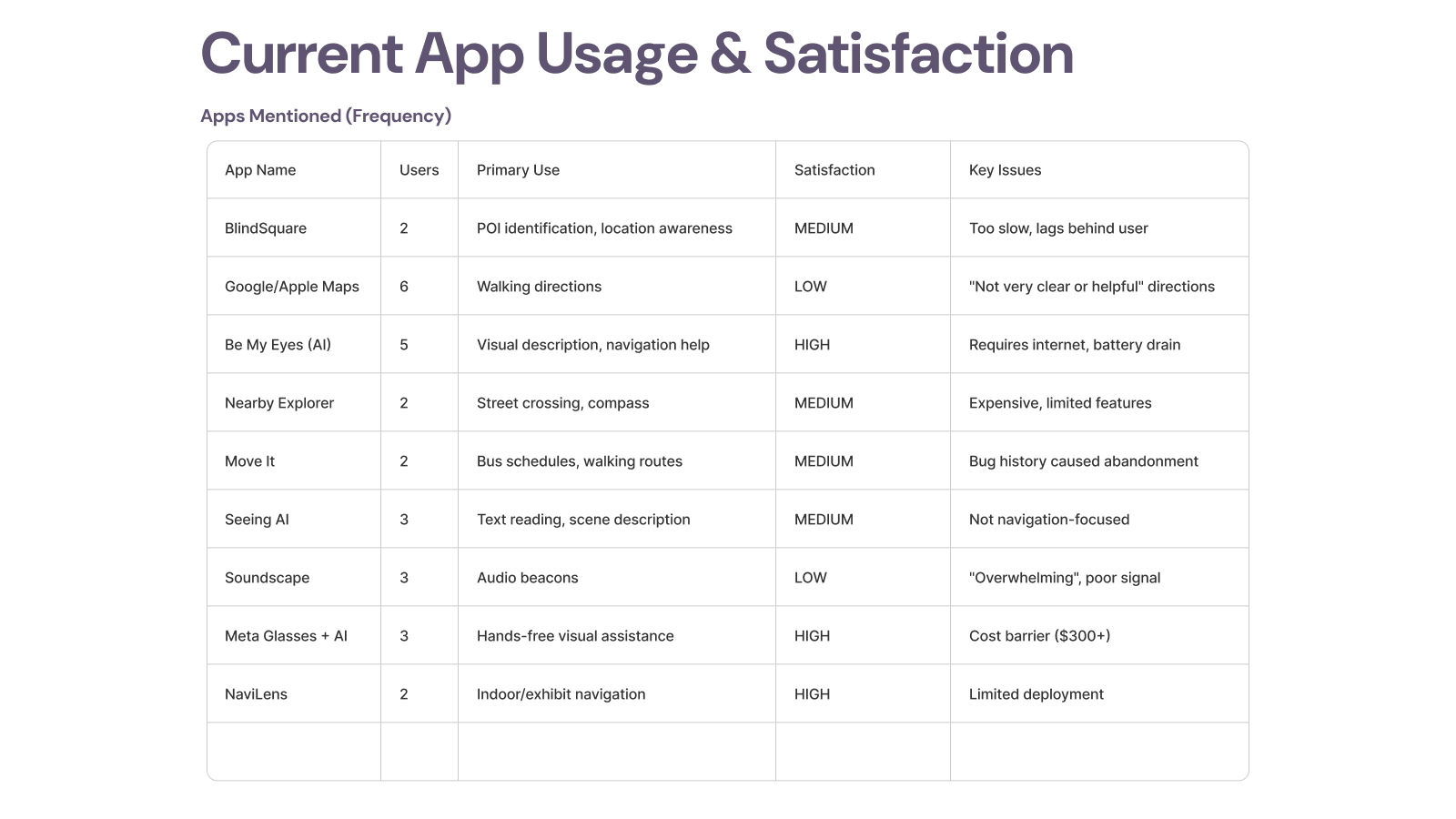
Current App Usage & Satisfaction
I catalogued which tools participants currently rely on, why they still use them, and why some have already been abandoned. That clarified where NeuroNav should complement existing tools instead of duplicating them.
- • BlindSquare - valuable for POI awareness but described as too slow.
- • Google/Apple Maps - used for walking directions, but satisfaction was low.
- • Be My Eyes / Seeing AI - high value for visual description, but not designed for active crossing safety.
- • Nearby Explorer - useful but costly relative to feature depth.
- • Transit tools - some were abandoned after reliability problems.
- • Soundscape - remembered fondly, but also described as overwhelming.
- • Meta Glasses + AI - attractive hands-free interaction, but cost remains a barrier.
- • NaviLens - strong for indoor use cases, limited by deployment footprint.
Feature Preferences That Shaped the MVP
- • Real-time vehicle detection with direction was the unanimous top need.
- • Distance-based urgency scaling mattered as much as detection itself.
- • Voice + haptics clearly outperformed tones alone.
- • Participants preferred extra false positives over a missed real threat.
- • Personalization mattered, but not at the cost of consistency and predictability.

Product Decisions That Mattered
On-Device vs. Cloud
I rejected cloud inference because latency, connectivity dependence, and remote video processing all undermine trust in a safety-critical system. On-device execution was not just a technical decision. It was a product trust decision.
Battery Life vs. Detection Quality
Higher frame rates improved responsiveness but drained the battery. I landed on 10 FPS as the best balance for pedestrian navigation and used adaptive frame processing when stationary.
Information Richness vs. Cognitive Load
Users needed direction, distance, and urgency, but not all at once. I used progressive disclosure: minimal initial alerts, deeper context only when needed or explicitly requested.
Trust Brittleness
For this category, trust is binary. That drove the core philosophy: when in doubt, alert. False positives are recoverable. False negatives are not.
The Solution
NeuroNav turns the smartphone camera into an electronic eye. The product detects vehicles, estimates distance, infers direction and urgency, and communicates that information through synchronized multimodal feedback. Phase 1 focused on proving that users could interpret and trust this interaction layer under pressure.
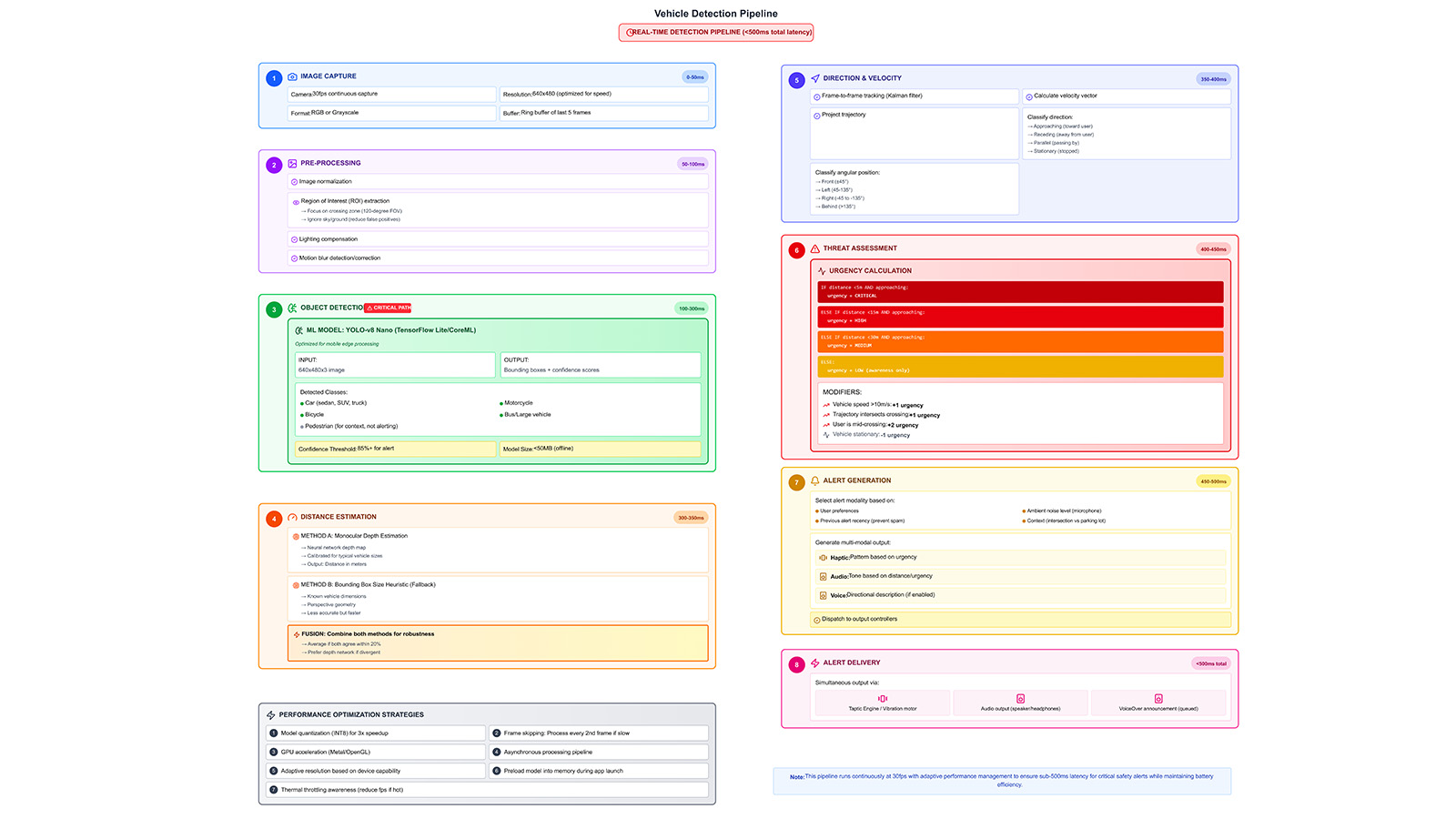
Real-Time Vehicle Detection Pipeline (<500ms)
- • Image capture from a 30fps camera feed
- • Pre-processing with ROI extraction, normalization, and motion filtering
- • YOLOv8-nano inference on-device
- • Distance estimation using monocular depth and bounding-box heuristics
- • Direction and velocity tracking frame-to-frame
- • Threat scoring based on distance, speed, and approach angle
- • Multimodal alert generation matched to urgency and context
Key Technical Breakthroughs
- • Context-aware orientation for left/right/front/behind alerts
- • Three haptic severity tiers users learned quickly
- • VoiceOver bridge for critical alert interruption
- • Simplified semantic hierarchy for screen-reader-first interaction
- • GPU inference scheduling for consistent performance
- • Tight synchronization across audio and haptic outputs
Voice Interaction Model
The product works as an ambient safety layer first, with conversational clarification layered on top. The model is simple by design:
- • Ambient alert
- • User voice query
- • Short contextual AI response
- • Automatic return to passive monitoring
Supported queries include: “What’s ahead of me?”, “Where is the vehicle coming from?”, “How far is it?”, “Is it safe to cross?”, and “Repeat last alert.”
Technical Architecture
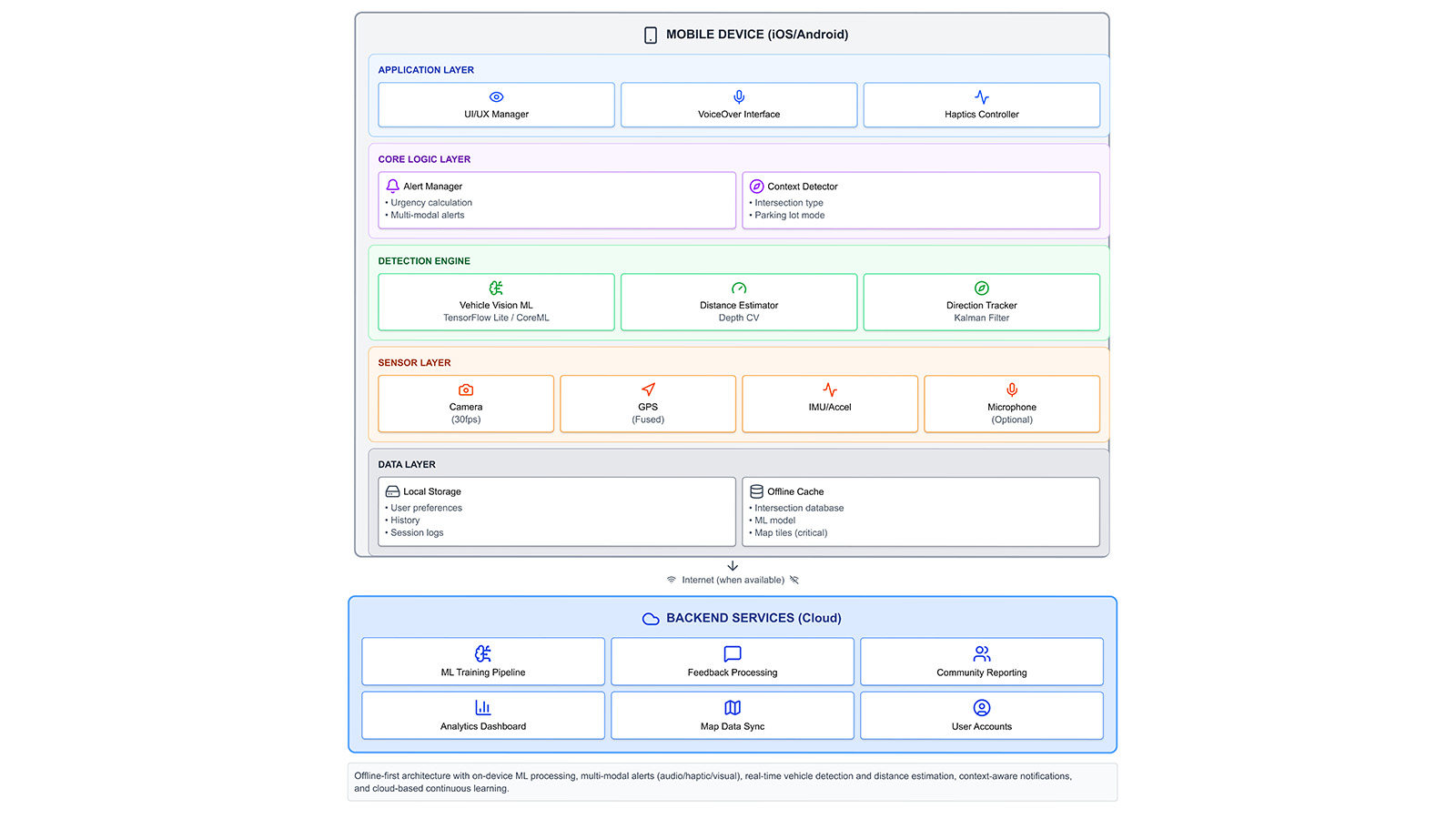
On-Device First, Cloud-Augmented Architecture
All safety-critical detection, urgency scoring, and multimodal alerts run entirely on the device. Optional cloud services are reserved for slower-moving workflows like analytics, retraining, and feedback aggregation. This architecture protects both privacy and reliability.
- • Application layer: UI manager, VoiceOver/TalkBack interface, and haptics controller
- • Core logic layer: Alert manager, context detector, distance estimator, and direction tracker
- • Sensor layer: Camera, GPS, and IMU fusion
- • Data layer: Local preferences, logs, and offline cache
- • Backend services: Training, reporting, and analytics support
User Testing Results
Phase 1 evaluation focused on trust calibration, alert comprehension, cognitive load, accessibility architecture, and decision-making confidence, because even a technically accurate system fails if users cannot trust or interpret it quickly enough in motion.
What Testing Proved
- • Users quickly understood the system’s purpose
- • Voice + haptics outperformed tone-heavy alerting
- • Customization directly increased trust and perceived usability
- • Accessibility architecture, not just detection, determines adoption
What Needed Correction
- • Audio tones overloaded sensory channels for 40% of participants
- • TalkBack integration emerged as an adoption prerequisite
- • Early alerts were too verbose for fast decision moments
- • Timing conflicts between modalities had to be tightened
Participant Quotes
"The voice is perfect, just tell me left, right, and distance."
— P2
"Tones get too much. Let me turn them off."
— P4
What 66% Adoption Intent Actually Tells Us
The two non-adopters revealed specific, addressable barriers — not product-market fit failure. P1 already felt safe with monocular vision and a cane, placing her outside the primary user segment entirely. P2 expressed technology anxiety tied to age and unfamiliarity, surfacing a real onboarding design gap rather than a rejection of the core value proposition.
Among the four adopters, intent was conditional on TalkBack/VoiceOver integration — a solvable engineering dependency, not a conceptual objection. The real signal: 100% of participants understood the problem, and everyone who faced it wanted the solution. The adoption gap is a usability gap, not a relevance gap.
Final Design Principles
- Safety Over Convenience - false positives are recoverable; false negatives are not.
- Trust Is Binary - users either trust the system completely or stop using it.
- Multimodal Redundancy - any single sensory channel can fail.
- User Agency Builds Adoption - people want meaningful control over safety technology.
- Context Determines Content - actionable direction and urgency beat extra description.
- Privacy Reinforces Reliability - on-device processing strengthens both.
- Design With, Not For - users shaped the product, not just validated it.
Immediate Next Steps
- • Full TalkBack and VoiceOver integration
- • Haptic pattern validation study
- • Natural TTS voice selection system
- • Alert throttling refinement
Scaling Path
- • Environmental mode switching
- • User-facing ML confidence scoring
- • Wearable integration pathways
- • Controlled field reliability studies
Long-Term Vision
- • Historical analytics for dangerous intersections
- • Iowa DOT beta partnership opportunities
- • National outreach to NFB and ACB
- • Open-source release of core architecture
If I Were PM for Phase 2
Phase 1 validated the interaction layer. Phase 2 has to validate the perception stack in the real world. Here's how I'd run it as a product manager.
North Star Metric
Crossing confidence score — user-reported confidence before and after each crossing, tracked per session.
Why: Accuracy alone doesn't equal adoption. A 95% detection rate means nothing if users still hesitate at intersections. Confidence is the proxy for real-world safety impact and the leading indicator of retention.
One Thing to Build Next
TalkBack/VoiceOver-native navigation. Not a nice-to-have - it's the prerequisite that unlocks independent use and removes the facilitator dependency that limited Phase 1 validity.
Until blind users can navigate the interface without verbal guidance, every other metric is contaminated. This is the single change that makes Phase 2 data trustworthy.
Biggest Risk to De-Risk First
Haptic pattern discrimination at population level. Only 1/6 Phase 1 participants confirmed distinguishable urgency tiers through haptics alone. If patterns fail at scale, the entire multimodal redundancy model collapses.
A 20-person haptic perception study before field trials costs 2 weeks and could save months of iteration post-launch.
Phase 2 Success Criteria (6-Month Pilot)
Reflections
NeuroNav taught me that accessibility is not a layer you add after the fact. It changes the product from the ground up. It changes what counts as clarity, speed, trust, and success.
I started this project with technical confidence. I knew how to run neural networks on mobile devices, build AR systems, and design multimodal interfaces. What I underestimated was how deeply visual bias shapes product assumptions.
The breakthrough came when I stopped thinking about accessibility features and started thinking about sensory translation. A silent vehicle is a visual threat. My job was to convert that threat into audio and haptic language users could trust fast enough to act on.
This project sharpened how I think about AI product design: not as automation for convenience, but as a system of responsibility. In safety-critical contexts, the interface is not decoration around the model. The interface is the contract between human judgment and machine output.
Key Takeaway
When P6 said “this would boost my confidence walking around outside,” I understood that confidence was the real deliverable. Phase 1 proved the interaction layer could create it. The next phase must prove the perception stack deserves it.